


OLED vs Mini-LED is one of the most important display comparisons for anyone shopping for a new TV or monitor in 2026. Both technologies can deliver excellent picture quality, strong HDR performance, and a premium viewing experience, but they achieve those results in very different ways.
OLED is generally the better choice for perfect blacks, contrast, viewing angles, and motion clarity. Mini-LED, meanwhile, has major advantages in brightness, bright-room viewing, sustained full-screen brightness, and avoiding OLED’s burn-in risk. The better option ultimately depends on how and where you use your display.
OLED vs Mini-LED at a Glance
| Feature | OLED | Mini-LED |
|---|---|---|
| Black levels | Excellent | Very good |
| Contrast | Excellent | Excellent, but varies |
| Brightness | Very good | Excellent |
| HDR | Excellent | Excellent |
| Blooming | Virtually none | Possible |
| Motion handling | Excellent | Very good to excellent |
| Viewing angles | Excellent | Depends on LCD panel |
| Text clarity | Can vary | Generally excellent |
| Burn-in risk | Yes | No traditional OLED burn-in |
| Bright-room performance | Very good | Excellent |
| Dark-room performance | Excellent | Very good to excellent |
| Gaming | Excellent | Excellent |
| Productivity | Very good | Excellent |
| Best for | Movies, gaming, dark rooms | Bright rooms, productivity, high brightness |
These are general characteristics rather than guarantees for every model. Individual displays can differ considerably depending on the panel, local-dimming system, processing, brightness, and other design choices.
What Is OLED?
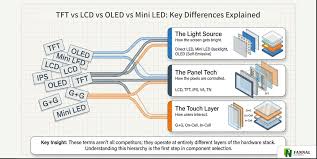
OLED stands for Organic Light-Emitting Diode. Unlike an LCD display, an OLED screen does not need a separate backlight.
Each OLED pixel produces its own light and can be controlled independently. When a pixel needs to display black, it can essentially turn itself off. This is what gives OLED displays their exceptionally deep blacks and extremely high contrast.
This self-emissive design also means OLED doesn’t need to illuminate a large area around a small bright object. A white subtitle on a black background, for example, can appear bright without creating the same type of halo around the subtitle that can occur on an LCD with local dimming.
OLED displays commonly use two major approaches: WOLED and QD-OLED. They have different structures and can differ in color and brightness performance, but both retain OLED’s fundamental advantage of individually controlled light-emitting pixels.

What Is Mini-LED?
Mini-LED is different from OLED because it is primarily a backlighting technology for LCD displays, rather than a self-emissive display technology.
A Mini-LED display still uses an LCD panel. Behind that panel is a backlight containing many small LEDs. Those LEDs are grouped into independently controlled zones through local dimming.
The smaller LEDs allow manufacturers to create more precise lighting control than conventional LED backlighting. When implemented well, Mini-LED can produce bright highlights while keeping much of the surrounding screen dark.
This is particularly useful for HDR content, where a display may need to show a very bright object against a dark background.
However, Mini-LED cannot normally control every individual pixel’s light output. Because the backlight operates in zones rather than at individual-pixel level, some light can spill into neighboring areas.
That effect is commonly called blooming or haloing.
Read More: How to Change the AirDrop Name on iPhone, iPad, and Mac
OLED vs Mini-LED: Black Levels and Contrast
This is where OLED has its clearest advantage.
Because OLED pixels can turn themselves off individually, an OLED can display extremely deep blacks without requiring a backlight to remain active behind them. That gives OLED an effectively near-infinite contrast ratio in typical measurements.
Mini-LED can produce impressive blacks through local dimming, especially on models with sophisticated backlight control. But the backlight still illuminates zones behind the LCD panel.
If a small bright object appears next to a large black area, the Mini-LED’s zone may need to remain partially illuminated. Some of that light can therefore appear around the bright object.
Winner: OLED
For movies in a dark room, the difference can be especially noticeable.
Brightness and HDR
Mini-LED’s biggest advantage is brightness.
Because Mini-LED displays use a dedicated LED backlight, they can achieve very high brightness levels and can often maintain high brightness across a large portion of the screen. Current TV testing continues to show Mini-LED/LED displays generally leading OLED in overall and full-screen brightness, although individual OLED models can be extremely bright as well.
This makes Mini-LED particularly attractive for:
- Bright living rooms
- Rooms with large windows
- Sports viewing
- HDR content with large bright scenes
- Users who want strong daytime visibility
OLED still delivers excellent HDR because its contrast is exceptional. A small bright highlight against a completely black background can look extremely impressive.
So the difference isn’t simply “Mini-LED has better HDR.”
Instead:
Mini-LED generally has the brightness advantage, while OLED has the contrast and black-level advantage.
Blooming and Haloing
Blooming is one of the most important differences to understand.
Imagine a black night sky with a bright moon. On an OLED, the pixels surrounding the moon can remain completely off.
On a Mini-LED display, the LEDs behind the moon’s local-dimming zone must illuminate that area. Depending on the size and behavior of the zone, some light may spread into the surrounding black area.
You may see a faint glow around the moon.
Better Mini-LED displays can dramatically reduce this effect through more sophisticated local dimming, but they cannot completely eliminate the fundamental limitation of zone-based backlighting.
More dimming zones can help, but zone count alone doesn’t guarantee better performance. The local-dimming algorithm and overall implementation are also important.
Winner: OLED
Color Performance
Both technologies can produce excellent colors.
OLED displays can deliver highly saturated colors, particularly QD-OLED models. Mini-LED displays can also provide excellent color performance, especially when combined with quantum-dot technology.
This means you shouldn’t choose between OLED and Mini-LED based solely on the assumption that one always has better colors.
The exact panel, color gamut, calibration, brightness behavior, and processing all matter.
For many premium displays, the difference is less important than the display’s overall implementation.
Viewing Angles
OLED generally performs very well when viewed away from the center.
Because OLED pixels are self-emissive, the image tends to retain its contrast and appearance at wider viewing angles.
Mini-LED performance depends heavily on the underlying LCD panel. IPS-based Mini-LED displays can have wide viewing angles, while some VA-based displays can show more noticeable changes when viewed from the side.
Winner: OLED overall, although a high-quality IPS Mini-LED can still perform very well.
Motion Handling
OLED has another major advantage in motion.
OLED pixels can change state extremely quickly, resulting in exceptionally fast response times. This can produce sharper motion during fast games and other moving content. Current monitor testing continues to show OLED’s strong advantage in motion handling.
Mini-LED displays can also have excellent motion performance, but Mini-LED itself doesn’t determine the LCD panel’s response characteristics. Performance can vary significantly between models.
For competitive gaming, fast shooters, racing games, and other motion-heavy content, OLED is generally the safer choice.
Winner: OLED
OLED vs Mini-LED for Gaming
For gaming, OLED is usually the stronger overall option.
Its combination of deep blacks, high contrast, extremely fast pixel response, and strong HDR performance makes games look exceptionally immersive. Fast-moving objects also tend to remain clearer because of OLED’s rapid response characteristics.
However, Mini-LED can be better in certain gaming environments.
If your gaming room is extremely bright, the additional brightness of Mini-LED can be valuable. It also avoids the OLED burn-in concern associated with long-term exposure to static elements.
Choose OLED for gaming if you prioritize:
- Fast competitive gameplay
- Excellent motion clarity
- Deep blacks
- HDR gaming
- Dark-room gaming
- Cinematic single-player games
Choose Mini-LED if you prioritize:
- Very high brightness
- Bright-room gaming
- Long sessions with static interface elements
- Avoiding OLED burn-in concerns
For most gaming-focused buyers, OLED has the edge.
OLED vs Mini-LED for Movies and TV
For movie watching, OLED is particularly compelling.
Dark scenes benefit enormously from OLED’s ability to turn individual pixels off. A night scene can contain bright stars, lights, or subtitles without producing the same blooming around those objects.
Mini-LED can still provide excellent movie performance, particularly on premium models with strong local dimming. It may even produce brighter HDR highlights and perform better in a room with substantial ambient light.
For a dark home theater
OLED is the better choice.
For a bright living room
Mini-LED is often the better choice.
OLED vs Mini-LED for Productivity
This is an area where the answer becomes less obvious.
For office work, spreadsheets, coding, web browsing, and documents, Mini-LED can be more practical.
One reason is text clarity. Some OLED monitors use unconventional subpixel arrangements that can produce visible color fringing around text, although the effect varies by panel and becomes less noticeable on higher-pixel-density displays. Traditional LCD layouts generally have an advantage for text rendering.
There is also the issue of static content.
A desktop can contain the same taskbar, application menus, browser controls, spreadsheets, and other interface elements for many hours. This type of usage makes OLED’s burn-in risk more relevant.
For heavy office productivity, Mini-LED is often the safer choice.
OLED Burn-In: Should You Be Worried?
OLED burn-in is one of the most important limitations to understand before buying.
Permanent image retention can occur when the same static elements remain on an OLED display for extended periods. This is particularly relevant for users who repeatedly display the same logos, news tickers, game HUDs, application interfaces, or desktop elements.
Modern OLED displays include technologies designed to reduce the risk, and ordinary mixed-content use does not mean an OLED will quickly burn in.
However, burn-in is not simply an outdated problem that has completely disappeared. Recent long-duration testing continues to show that static-heavy use can remain a genuine consideration.
If your display will mostly show varied games, movies, videos, and changing content, OLED can still be an excellent choice.
If the display will spend most of every working day showing static desktop content, Mini-LED provides more peace of mind.
Mini-LED vs OLED in a Bright Room
For a bright room, Mini-LED has a strong advantage.
Its high brightness can help overcome ambient light from windows and room lighting. This makes the picture easier to see during daytime viewing.
OLED can still work very well in a bright environment, particularly newer high-end models, but Mini-LED generally offers more headroom when maximum brightness is important.
Bright room: Mini-LED
Mini-LED vs OLED in a Dark Room
For a dark room, OLED is usually the better choice.
The absence of a backlight allows OLED to produce extremely deep blacks without the haloing associated with local-dimming LCDs.
This can make dark movies, sci-fi scenes, horror games, and other high-contrast content look more natural and immersive.
Dark room: OLED
Power Consumption
Power consumption is more complicated than simply declaring one technology more efficient.
OLED’s power use changes significantly depending on the content being displayed. Bright images can require more power than darker images because more pixels are producing light.
Mini-LED displays also vary depending on their backlight design, brightness level, local dimming behavior, and screen size.
Therefore, power efficiency should be evaluated using the actual model rather than choosing OLED or Mini-LED based solely on the technology name.
Price and Value
OLED has traditionally occupied the premium end of the market, although prices and availability have become more competitive.
Mini-LED displays are available across a wider range of price points, and the technology is becoming more accessible. Current 2026 market testing shows an expanding selection of Mini-LED monitors, including options that can cost less than premium OLED alternatives.
Still, price should not be the only deciding factor.
A high-end Mini-LED can outperform a cheaper OLED in some areas, while a premium OLED can outperform a budget Mini-LED by a large margin.
Always compare the specific models, not just their display technologies.
OLED vs Mini-LED: Which Is Better for You?
The easiest way to decide is to start with your actual usage.
Choose OLED if you want the best cinematic picture
OLED is the better fit if you primarily watch movies and shows, especially in a darker room.
Its perfect black capability, excellent contrast, lack of traditional blooming, and strong motion handling create an exceptionally immersive image.
Choose OLED if gaming is your priority
For fast-paced gaming and HDR gaming, OLED’s response time and contrast make it an excellent choice.
Choose Mini-LED if your room is very bright
If sunlight or strong indoor lighting is a constant problem, Mini-LED’s high brightness can be more useful than OLED’s perfect blacks.
Choose Mini-LED for heavy productivity
If you spend most of your day working with documents, spreadsheets, browser windows, coding environments, or other static interfaces, Mini-LED can be the safer long-term choice.
Choose Mini-LED if burn-in concerns you
If you simply don’t want to think about OLED burn-in, Mini-LED removes that particular concern.
Choose OLED if motion clarity matters most
Competitive gamers and anyone sensitive to motion blur can benefit from OLED’s extremely fast pixel response.
Common Mistakes When Choosing OLED or Mini-LED
Assuming OLED is always brighter
Modern OLED displays can become very bright, but Mini-LED generally retains an advantage in sustained and full-screen brightness.
Assuming every Mini-LED is the same
Mini-LED performance varies significantly. Local-dimming quality, zone count, LCD panel type, processing, and brightness all matter.
Choosing based only on dimming-zone count
More zones can improve control, but zone count alone doesn’t determine how good the local dimming will look.
Ignoring your room
A display that looks perfect in a dark showroom may not be the best option for a room filled with sunlight.
Ignoring your workload
A gaming-focused buyer and someone who spends eight hours working with spreadsheets have very different requirements.
Treating burn-in as either impossible or inevitable
Both extremes are misleading.
OLED burn-in is a real long-term consideration with static-heavy usage, but that does not mean every OLED user will experience it quickly. Recent testing shows the risk is particularly relevant when static content is displayed extensively over long periods.
OLED vs Mini-LED: Final Verdict
OLED vs Mini-LED isn’t really about finding one technology that wins every category.
OLED is the better overall choice when picture quality, perfect blacks, contrast, viewing angles, and motion clarity are the highest priorities. It is especially impressive for movies, HDR content, and gaming in darker environments.
Mini-LED is the better choice when brightness, bright-room performance, productivity, and avoiding OLED burn-in concerns matter more. A high-quality Mini-LED can also deliver excellent HDR and contrast while providing significantly more brightness than many OLED displays.
For most movie lovers and serious gamers, OLED is the technology to choose.
For bright rooms, heavy office work, and users who want to avoid burn-in concerns, Mini-LED is often the smarter choice.
The most important point is to compare the actual display models, not just the technology printed on the box. A well-designed Mini-LED can be outstanding, and a poorly implemented display can fail to deliver the advantages you expect. Likewise, OLED performance varies by panel type and model.

1 Comment
Pingback: Best Remote Work Software for Teams: Top Tools Compared