

Square is a payment processing platform that combines POS capabilities with business management tools for both online and in-person sales. Here’s a closer look at how Square works, its pricing, and the types of businesses it’s best suited for.
Key Takeaways
- Square brings payment processing, POS software, and essential business management tools together on one platform.
- Its basic POS software is free, while Square Plus and Premium plans offer more advanced features and potentially lower processing rates.
- Square follows a flat-rate pricing model and requires businesses to process payments through Square Payments.
- Businesses can accept in-person, online, and remote payments while managing inventory, customers, employees, and other operations.
- Square is well suited to small and midsize businesses, though larger, high-volume, or highly customized businesses may find other solutions more cost-effective.
Square began as a simple mobile card reader and has evolved into a comprehensive business platform covering payment processing, point-of-sale (POS) operations, and back-office management. Businesses can use it to accept in-person, online, and remote payments while handling inventory, customer information, and cash flow through one integrated system.
One of Square’s biggest advantages is its free entry-level option, transparent pricing, and broad selection of tools that can grow alongside a business. However, its flat-rate payment structure and limited customization may not be ideal for every business model.
This guide explains how Square works, how much it costs, its key features, and when choosing an alternative may make more sense.
What Is Square?
Square is a cloud-based business platform that allows companies to process payments and manage day-to-day operations through a single system. Although it began primarily as a payment processing service, Square has expanded to support both online and in-person sales, along with a range of business management tools.
The company gained widespread attention in 2009 after introducing its mobile card reader, giving small businesses an easy way to accept card payments without lengthy contracts, complicated approval processes, or significant upfront expenses. This straightforward approach helped make modern payment technology more accessible to businesses of all sizes.
Today, Square offers much more than payment processing, with a broad set of tools designed to help businesses manage sales and daily operations, including:
- Point-of-sale (POS) software
- Payment processing for online and in-person transactions
- Ecommerce and online checkout solutions
- Customer and employee management tools
- Business banking and financial services
Because these tools work within the same ecosystem, transaction, inventory, and customer information can sync automatically across the platform. This gives businesses a centralized way to process sales, monitor performance, and handle routine tasks without having to manage multiple separate systems.
Square is primarily geared toward small and midsize businesses, but it also supports multi-location businesses and more complex workflows. Its modular approach lets businesses start with basic tools and add additional features as their needs expand.
How Does Square Work?
Square combines payment processing with a range of business management tools, allowing businesses to handle sales and operations from one platform. At its core, Square lets businesses accept payments through credit cards, contactless methods, and ACH transfers, with transactions processed through Square Payments.
After a payment is completed, the transaction is automatically recorded across Square’s connected tools for sales tracking, inventory management, customer information, and reporting. This reduces the need for manual data entry and helps keep business information consistent across the platform.
Square’s ecosystem is divided into several integrated areas:
- Payments: Supports in-person and mobile payments, POS hardware, virtual terminals, invoicing, and payment dispute management.
- Point of sale (POS): Provides mobile and tablet apps along with inventory tracking, reporting, and customer and employee management features.
- Industry-specific POS: Includes dedicated solutions such as Square for Retail, Square for Restaurants, and Square Appointments for service-based businesses.
- Online selling: Square Online provides ecommerce features, online ordering, and checkout tools.
- Business management: Includes payroll, email marketing, customer communication, and loyalty programs.
- Banking: Offers business checking and savings accounts, debit cards, and financing options.
Since these tools are connected, information can update automatically as transactions take place. For instance, when a sale is completed, inventory levels can be adjusted and the transaction can be reflected in sales reports without requiring separate updates.
What Can You Do With a Free Square Account?
One of Square’s biggest advantages is its free plan, which lets businesses start accepting payments and managing basic operations without paying an upfront software subscription. This makes it a practical choice for startups, small businesses, and occasional sellers looking for an affordable way to get started. In many cases, businesses can begin accepting payments on the same day.
The free account includes the essential tools needed to sell products or services and manage everyday transactions. While more advanced capabilities require a paid plan, the free tier supports in-person, online, and remote sales through a single platform.
Accept Payments Across Multiple Channels
Accept in-person payments using tap, dip, or swipe methods, process online payments through checkout links or a basic online store, and send invoices for remote transactions—all without a monthly software subscription.
Use a Point-of-Sale (POS) System
Square’s POS tools let businesses process itemized or custom sales, monitor transactions in real time, maintain a basic product catalog, and manage sales through the Square app on smartphones, tablets, or compatible hardware.
Sell Online With a Basic Website
Businesses can create a simple online storefront, accept pickup or delivery orders, sync products and sales across channels, and share checkout links, QR codes, or buy buttons with customers.
Send Invoices and Manage Payments
Square allows businesses to create and send invoices, accept card and online payments, track outstanding balances, and manage basic billing tasks from the same platform.
Manage Bookings and Appointments
Service-based businesses can accept online bookings, organize schedules, and connect appointments with customer profiles and payment information.
Access Basic Financial Tools
Eligible businesses can use Square’s financial services, including business checking and savings accounts. These tools can also help monitor cash flow and move funds from sales within the Square ecosystem.
How Is Square Priced?
Square’s pricing is one of the reasons the platform is popular with small businesses. You can get started with Square’s POS tools for retail, restaurants, appointments, and general sales without a monthly software fee or long-term contract.
In October 2025, Square introduced a unified pricing structure with three plans: Square Free, Square Plus, and Square Premium. Instead of pricing its business tools separately, Square groups them into these plans, with higher tiers offering additional features and more favorable payment processing rates.
Square uses a combination of subscription fees and per-transaction charges. Businesses can begin with the free plan and move to a paid tier as their needs grow, but payment processing fees still apply based on the type of transaction and payment method.
Here’s a closer look at each Square plan, what it includes, and how the platform’s transaction fees can affect your overall costs.
Square Pricing Plans
Square uses an account-level pricing structure, so businesses can access its core tools through a single plan rather than paying for separate subscriptions for individual products. The basic POS software is free, while businesses pay a monthly subscription when they move to plans with more advanced features.
Paid plans are charged per location and add capabilities across areas such as reporting, marketing, employee management, and industry-specific operations. This tiered approach makes it easier to access multiple tools without subscribing to each one separately.
- Square Free ($0/month per location): Includes POS software, a basic online store, invoicing, and payment processing. Support includes chat and email, along with limited phone support from 6 a.m. to 6 p.m. PT, Monday through Friday, during the first 90 days. Advanced features such as text marketing, kiosk apps, and kitchen display system (KDS) tools are not included.
- Square Plus ($49/month per location): Includes everything in the Free plan, plus expanded POS features and additional tools such as text message marketing. The plan includes 500 marketing messages, with additional messages costing 3 cents each. It also provides full weekday phone support from 6 a.m. to 6 p.m. PT. Optional add-ons include Square KDS at $30 per device per month and Square Kiosk at $50 per device per month.
- Square Premium ($149/month per location): Includes all Plus features, along with 24/7 phone support, 2,500 included text marketing messages, and a reduced rate of 1.5 cents per additional message. Premium also lowers the cost of certain add-ons, including Square KDS at $20 per device per month and Square Kiosk at $30 per device per month.
Additional Fees and Feature-Based Pricing
Beyond the subscription cost, some Square features carry separate fees depending on the plan and services a business uses.
- Gift card fees: Physical and eGift cards have a 2.5% load fee on Free and Plus plans, while Premium removes this charge.
- Customer engagement: Text message marketing is unavailable on Free, available with limited included messages on Plus, and offered with higher limits and lower per-message rates on Premium.
- Inventory tools: Advanced inventory integrations, including Square Restaurant Inventory by MarketMan, are available as paid add-ons starting at $99 per month per location on eligible higher-tier plans.
- Restaurant tools: Square KDS and Square Kiosk are not included with the Free plan. Plus and Premium customers can add them for a monthly fee per device, with Premium offering lower rates.
Square Payment Processing Fees
Square uses a flat-rate payment processing model, so businesses pay a predetermined fee for each transaction rather than interchange-plus pricing. This makes costs easier to estimate, but it also means businesses using Square’s ecosystem must process payments through Square Payments.
Unlike some POS providers, Square does not allow businesses to connect third-party payment processors. As a result, you cannot switch processors within Square to negotiate better rates or find a lower-cost provider.
Square’s standard payment processing fees include:
- Cash, checks, and other non-card payments: No processing fee
- In-person payments (tap, dip, or swipe): 2.6% + 15 cents per transaction
- Online payments: 3.3% + 30 cents per transaction
- Invoice payments: 3.3% + 30 cents per transaction
- Manually entered payments: 3.5% + 15 cents per transaction
- ACH bank transfers: 1% per transaction, with a $1 minimum
- Afterpay transactions: 6% + 30 cents per transaction
- CBD program transactions: Starting at 3.5% + 10 cents per transaction
- Bitcoin payments: 0% until 2027
Square does not charge a separate monthly fee specifically for payment processing. However, transaction fees apply regardless of which Square subscription plan you use.
Businesses processing more than $250,000 in annual sales may qualify for custom pricing and potentially lower processing rates. These rates are not publicly listed and typically require contacting Square’s sales team.
Square may also provide chargeback protection by waiving certain dispute fees up to a specified monthly limit, which can help reduce the cost of payment disputes.
Related:
- Best Small Business POS Systems
- Best Retail POS Systems
How Long Does Square Take to Process Payments?
Square offers several payout options, allowing businesses to choose how quickly they want funds from completed transactions transferred to their bank account. Standard transfers are typically completed on the next business day at no additional cost.
Payments accepted before 5 p.m. PT / 8 p.m. ET are generally eligible for next-business-day deposits. For example, payments processed on Friday before the cutoff are typically deposited by Monday morning, although the exact timing can vary depending on the receiving bank.
For businesses that need faster access to their money, Square also offers instant and same-day transfers for an additional 1.75% fee of the transferred amount.
Square Hardware
Square’s hardware lineup gives businesses a flexible way to start accepting payments and expand their setup as their needs grow. Businesses can begin with the Square POS app on a compatible smartphone or use a free magstripe reader with their first order.
For businesses that need more advanced equipment, Square offers everything from portable card readers and handheld POS devices to countertop terminals and complete register systems. This makes it possible to upgrade the hardware without moving to a different POS platform. Financing options are available, and businesses can also arrange short-term hardware rentals through Fello.
Square Hardware Devices
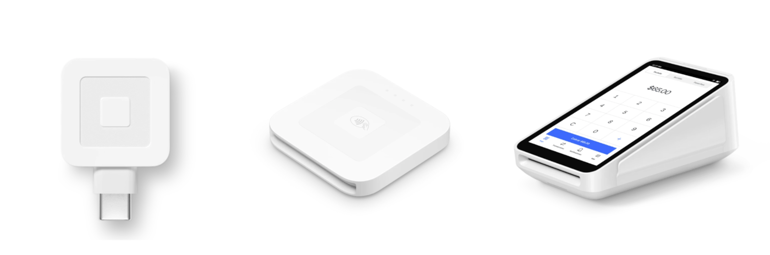
- Square Reader for Magstripe (first reader free): A basic swipe card reader that does not require charging. It offers the simplest and least expensive way to accept card payments in person, although it is better suited to occasional sellers or as a backup reader.
- Square Reader for Contactless and Chip ($59): A compact, portable reader that accepts contactless and chip payments. It is a practical choice for mobile sellers and businesses that want to support newer payment methods.
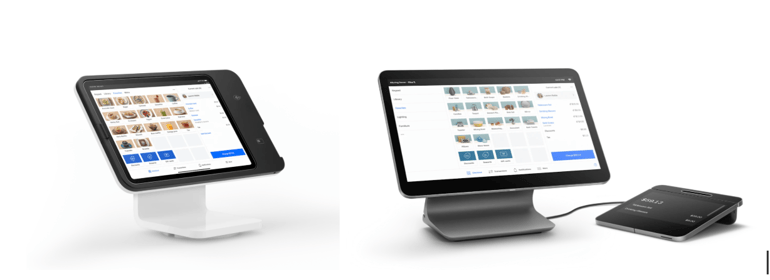
- Square Stand ($149 or $14/month for 12 months): An iPad-based countertop POS system with a rotating design and built-in card readers. It works well for small retail counters and businesses looking for a more dedicated checkout station.
- Square Handheld ($399 or $37/month for 12 months): A portable POS device designed for tableside ordering and payments. It includes a built-in barcode scanner and is particularly useful for restaurants, line-busting, and employees who need to process sales while moving around a store.
- Square Terminal ($299 or $27/month for 12 months): An all-in-one POS device with an integrated receipt printer. It supports tap, dip, and swipe payments and can operate without a separate smartphone or tablet.
- Square Register (2nd generation) ($899 or $44/month for 24 months): A complete POS system featuring separate customer and employee displays. It is designed for busy checkout areas and higher-volume businesses that need a more comprehensive in-store setup.
Best Square Hardware Use Cases
Square offers different hardware options for different selling environments, so the right choice depends on your budget, sales volume, and how your business operates.
- For one-time events or temporary setups: Consider renting Square hardware through Fello instead of purchasing equipment you only need for a short period. Fello offers rental options for larger registers, mobile POS devices, and accessories, with availability, pricing, and optional services depending on the rental requirements. Confirm current rental terms, insurance options, and setup services directly with Fello before booking.
- For the lowest-cost setup: Use the free magstripe reader or Tap to Pay on a compatible phone. Both options minimize upfront hardware expenses and are suitable for businesses that only need basic payment acceptance.
- For mobile sellers: Choose the Square Reader for Contactless and Chip if you need a compact device for markets, pop-ups, mobile services, or field sales.
- For tableside service or mobile staff: Square Handheld is a strong choice for restaurants and businesses where employees need to take orders and payments while moving around. Its built-in barcode scanner adds extra convenience.
- For service businesses and quick counter sales: Square Terminal provides an all-in-one payment and POS solution with a built-in receipt printer, eliminating the need for a separate phone or tablet.
- For small retail counters and cafes: Square Stand works well if you want an iPad-based countertop POS with a more traditional checkout experience.
- For busy retail stores and restaurants: Square Register is designed for higher-volume environments that need a dedicated countertop POS, dual displays, and a faster checkout workflow.
Square POS Systems by Industry
Square offers industry-specific POS solutions designed around the workflows of different types of businesses. While each option is built on Square’s core platform, they add features tailored to retail, restaurants, and service-based operations.
- Retail businesses (Square for Retail): Manage inventory with stock alerts, process returns and exchanges, synchronize online and in-store sales, and handle fulfillment through shipping, delivery, or in-store pickup.
- Restaurants (Square for Restaurants): Take orders at the table or counter, manage dine-in, pickup, and delivery orders from one system, and coordinate front- and back-of-house operations more efficiently.
- Service businesses (Square Appointments): Accept online bookings, manage staff schedules and calendars, process payments before or after appointments, and send automated reminders to help reduce missed bookings.
Square Benefits
Square offers several advantages for small and midsize businesses looking for a straightforward platform that combines payments with everyday business management.
- Free entry point: Businesses can start with a $0/month plan that includes POS software, online selling tools, and invoicing without upfront software costs.
- All-in-one platform: Manage payments, POS operations, ecommerce, customers, and basic financial tools from one system instead of relying on multiple providers.
- Easy to use: Square is designed for quick setup, with intuitive POS apps, compatible hardware, and a centralized dashboard for managing operations.
- Transparent pricing: Flat-rate transaction fees and the absence of long-term contracts make Square’s costs relatively easy to understand and predict.
- Omnichannel selling: Accept payments in person, online, through mobile devices, and remotely while keeping transaction data in one place.
- Scalability: Start with essential tools and add paid features, hardware, or higher-tier plans as your business expands.
Square Drawbacks
Despite its broad feature set and ease of use, Square has some limitations that may make it less suitable for certain businesses.
- Business restrictions: Square does not support certain high-risk industries, including online gambling and some age-restricted businesses.
- Payment processing costs: Square’s flat-rate pricing is straightforward, but its processing fees may not be the most competitive for businesses with high transaction volumes. Businesses processing more than $250,000 annually may qualify for custom rates, while other providers may offer different pricing structures.
- Customer support: Support availability varies by plan, with more extensive support reserved for higher-tier subscriptions. Some users have also reported inconsistent experiences when dealing with customer service.
- Account stability: Some third-party reviews report issues involving account holds or payment freezes, particularly in situations involving unusual transaction activity, chargebacks, or suspected fraud. Resolving these issues can take time and may temporarily affect cash flow.
Is Square Right for Your Business?
Square can be a strong option if you want an easy-to-use, all-in-one platform for accepting payments and managing everyday operations. However, its pricing structure, customization limits, and business restrictions mean it is not the ideal choice for every company.
Best suited for:
- Small and midsize businesses
- Businesses selling both online and in person
- Companies that want payments, POS, and business management tools in one platform
- Businesses that value simple setup and predictable pricing
Less suitable for:
- Enterprise businesses with complex integration requirements
- High-volume businesses primarily focused on minimizing processing costs
- Companies that need highly customized payment workflows or greater control over payment processing
Square Competitors and Alternatives
Square is a capable all-in-one platform, but it may not be the right choice for every business. Transaction volume, technical requirements, payment processing costs, and the level of customization you need can all influence which provider makes the most sense.
Square vs. PayPal
- Square offers a complete POS ecosystem: Square combines POS software, payment processing, hardware, inventory management, and other business tools, making it a strong option for businesses that sell both in person and online.
- PayPal focuses more heavily on online payments: PayPal is widely used for ecommerce and peer-to-peer payments and offers straightforward checkout integrations, but it generally provides fewer built-in POS and operational tools than Square.
Best for: Square is a better choice if you need in-person selling and a broader business management system. PayPal may be a better fit for businesses that primarily sell online and want a familiar payment option.
Square vs. Stripe
- Square emphasizes simplicity: Square is built for quick setup, combining payments, POS, hardware, and business management features in a ready-to-use platform.
- Stripe provides greater customization: Stripe is more developer-oriented, offering extensive APIs and tools for creating custom checkout experiences, subscriptions, and integrations.
Best for: Square works well for businesses that want an out-of-the-box solution with minimal technical work, while Stripe is better suited to teams that need customized payment workflows and deeper control over their technology stack.
Square vs. Helcim
- Square uses flat-rate pricing: Square charges predetermined rates for transactions, making fees relatively easy to understand but potentially more expensive as processing volume increases.
- Helcim uses interchange-plus pricing: Helcim separates card network costs from its markup, which can result in lower processing expenses for businesses with higher transaction volumes.
Best for: Square is a strong choice for businesses that prioritize simplicity, while Helcim may appeal more to businesses focused on reducing payment processing costs at higher volumes.
When Should You Consider a Square Alternative?
Square alternatives may be worth considering if:
- You process a high volume of transactions: Flat-rate processing can become expensive as sales increase, making interchange-plus pricing potentially more economical.
- You need customized checkout experiences: Platforms such as Stripe offer more flexibility for building tailored payment flows.
- You require advanced API access: Developer-focused platforms can provide greater technical control and integration options.
- You primarily sell online: If you don’t need POS hardware or in-person sales tools, an online-focused provider such as PayPal or Stripe may offer a simpler setup.
Related: 7 Best Square Alternatives Reviewed by Experts
How to Set Up a Square Business Account
Getting started with Square involves creating a business account, verifying your identity, connecting a bank account, and configuring your sales tools. Follow these steps:
Step 1: Choose Your Business Structure
During signup, Square will ask you to identify your business structure. Options may include sole proprietorship, limited liability company (LLC), private or public company, partnership, or nonprofit organization. The information required can vary depending on the structure you select.
Step 2: Verify Your Identity
Square requires personal information to verify the identity of people opening accounts. These requirements are part of financial and regulatory obligations that apply to payment service providers.
Step 3: Connect Your Bank Account
Link the bank account where you want Square to deposit your funds. A dedicated business bank account is generally preferable if you have one available.
Step 4: Configure Your Transfer Options
Square uses a next-business-day transfer schedule by default. If you need faster access to your funds, you can use instant or same-day transfer options for an additional fee.
Step 5: Access Your Square Account
Once the initial setup is complete, you can manage your account through the Square Point of Sale app or Square Dashboard from a web browser.
Step 6: Order Square Hardware
If you plan to accept payments in person, choose and order the Square hardware that best matches your business needs.
Step 7: Add Your Products or Services
Use Square’s item library to create, edit, organize, and manage the products or services you sell.
Step 8: Add Team Members
If you have employees or other staff members, you can add them through the Square Point of Sale app or Dashboard. In the Dashboard, navigate to Staff > Team > Team Members and select Add Team Member.
Step 9: Set Up Square Online
If you plan to sell online, you can create a Square Online store and configure it to accept orders and payments through the web.
How to Use the Square Payment System
Square can be used to accept payments in person, through mobile devices, online, and remotely. Depending on your setup, you can also process manually entered and recurring payments. The steps below explain how to process mobile and in-person transactions.
How to Accept Mobile Payments
- Download the Square POS app: Install the latest version of the Square Point of Sale app on your iOS or Android device.
- Sign in: Open the app and log in to your Square account.
- Connect a card reader: Connect a compatible Square reader to your phone. Depending on the model, you may plug it directly into the device or connect it through Bluetooth.
- Select the items: Open the item library and add the products or services included in the transaction.
- Start checkout: Tap Checkout, review the order, and select Charge when you’re ready to collect payment.
- Choose the payment method: Let the customer pay using tap, dip, or swipe, or select another available option such as cash, a manually entered card payment, payment link, or QR code.
- Complete the transaction: Once the payment is approved, Square records the transaction and updates the relevant sales information.
Offline payments: Square can temporarily process payments when an internet connection is unavailable, provided offline payments are enabled and your account and device are eligible. Square’s current offline-payment rules, including the time limit for uploading transactions, should be checked before relying on this feature because eligibility and limits can change.
How to Accept In-Person Payments
- Choose your hardware: Purchase the Square device that best fits your business, such as Square Terminal, Square Stand, or Square Register.
- Set up your POS: Sign in to your Square account on the device and configure your store, products, payment settings, and other required options.
- Create the sale: Add products or services from the item library and review the transaction on the POS screen.
- Collect payment: Use the connected Square hardware to accept the customer’s payment by tap, dip, swipe, or another supported payment method.
- Complete the sale: After the payment is approved, Square records the transaction and updates your sales and reporting data.
Frequently Asked Questions (FAQs)
Is Paying Through Square Safe?
Yes. Square uses security measures such as encryption, tokenization, and PCI-compliant systems to help protect payment information and reduce the risk of sensitive data being exposed.
How Much Does Square Charge?
Square uses a flat-rate payment processing model. In-person payments start at 2.6% + 15 cents per transaction, while online payments start at 3.3% + 30 cents. Rates can vary depending on the payment method and transaction type.
Can I Withdraw Money From Square?
Yes. Square can transfer your available funds to a linked bank account through its standard next-business-day schedule at no additional transfer fee. Faster options, including instant transfers, are available for an additional charge. Businesses can also configure automatic transfer schedules.
Does Square Support Recurring Payments?
Yes. Square supports recurring payments through options such as card-on-file payments, Square Invoices, and subscriptions. These features can be configured through the Square Dashboard.
Conclusion
Square stands out as an accessible all-in-one payment and POS platform, particularly for small and midsize businesses that want to manage sales, payments, inventory, customers, and other operations from one system. Its free starting plan, straightforward setup, broad payment options, and flexible hardware lineup make it easy to get started without a large upfront investment.
However, Square isn’t ideal for every business. Flat-rate processing fees can become less attractive at higher sales volumes, while businesses with complex payment workflows or advanced customization needs may benefit from alternatives such as Stripe or interchange-plus providers.

1 Comment
Pingback: How to Protect Yourself From Phishing Attacks in 2026